What Went Wrong
Two things broke around the same time:
In VS Code, GitHub Copilot Chat (using my own OpenRouter key) kept popping up this error:
Sorry, your request failed. Please try again. Error Code: net::ERR_FAILED.In my side projects, calls to the same model (
z-ai/glm-5.3-flash) would hang for about 90 seconds, then come back with an empty answer — or just the model's hidden "thinking" text with no actual reply.
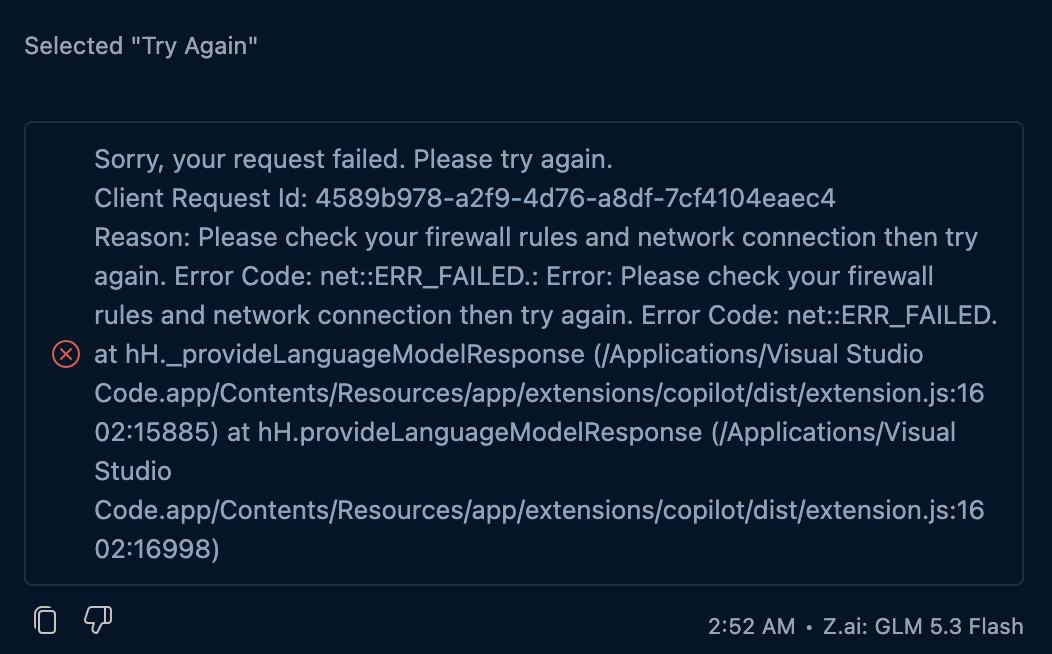
The VS Code message says "check your firewall rules and network connection." That was a red herring — my network was perfectly fine.
How OpenRouter Works
This is the key to understanding the whole problem.
OpenRouter doesn't run the models itself. It's a middleman. When you ask for a model like glm-5.3-flash, OpenRouter sends your request to one of several different companies (called providers) that host that same model. If one of those providers is unavailable, OpenRouter automatically sends the request to another one.
But there's a catch: a provider doesn't have to be fully down to cause problems. It can also be slow and half-broken — and OpenRouter's health check is very coarse (it only catches providers that completely failed in the last 30 seconds). So a struggling provider stays in the rotation, and some of your requests randomly land on it.
That's exactly what happened here.
Finding the Causes
I asked Hermes Agent to investigate the issue instead of guessing:
Every failing call hit the same model, with the same symptom: a long hang, then an empty or "thinking-only" reply.
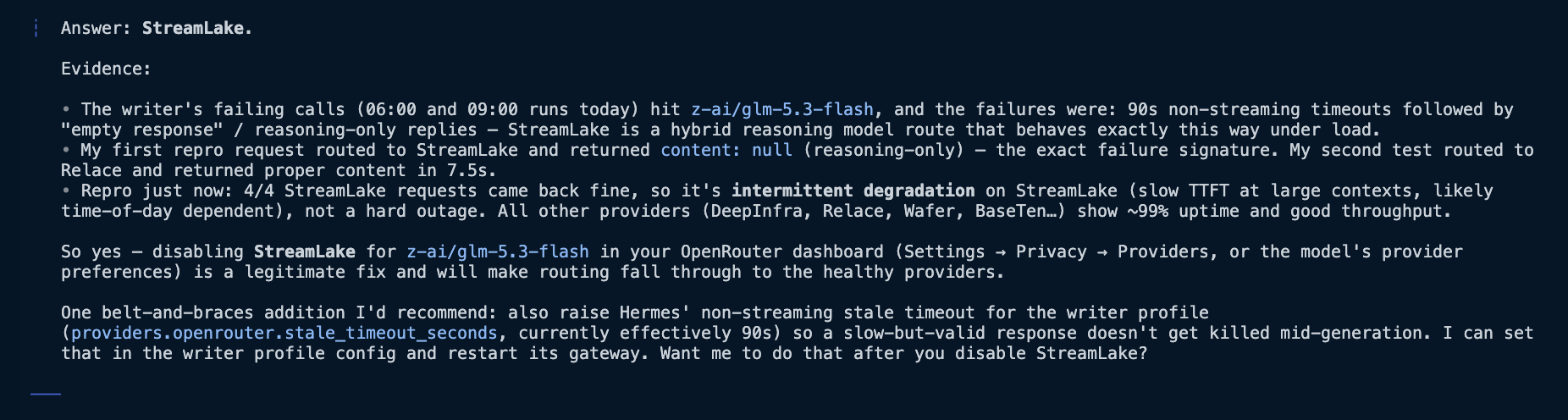
Test 1 landed on a provider called StreamLake → empty response. Same failure.
Test 2 landed on a different provider (Relace) hosting the same model → success response in 7.5 seconds.
More tests showed StreamLake sometimes worked fine — so it wasn't down, just unreliable (slow under load). Every other provider was healthy.
Hermes's verdict: StreamLake. Here's the diagnosis summary it produced after those tests:
Solution: Tell OpenRouter to Skip That Provider
The fix takes two clicks and requires zero code changes:
Go to the OpenRouter dashboard, under Workspaces → Guardrails
Under the Workspace Guardrail section, disable StreamLake
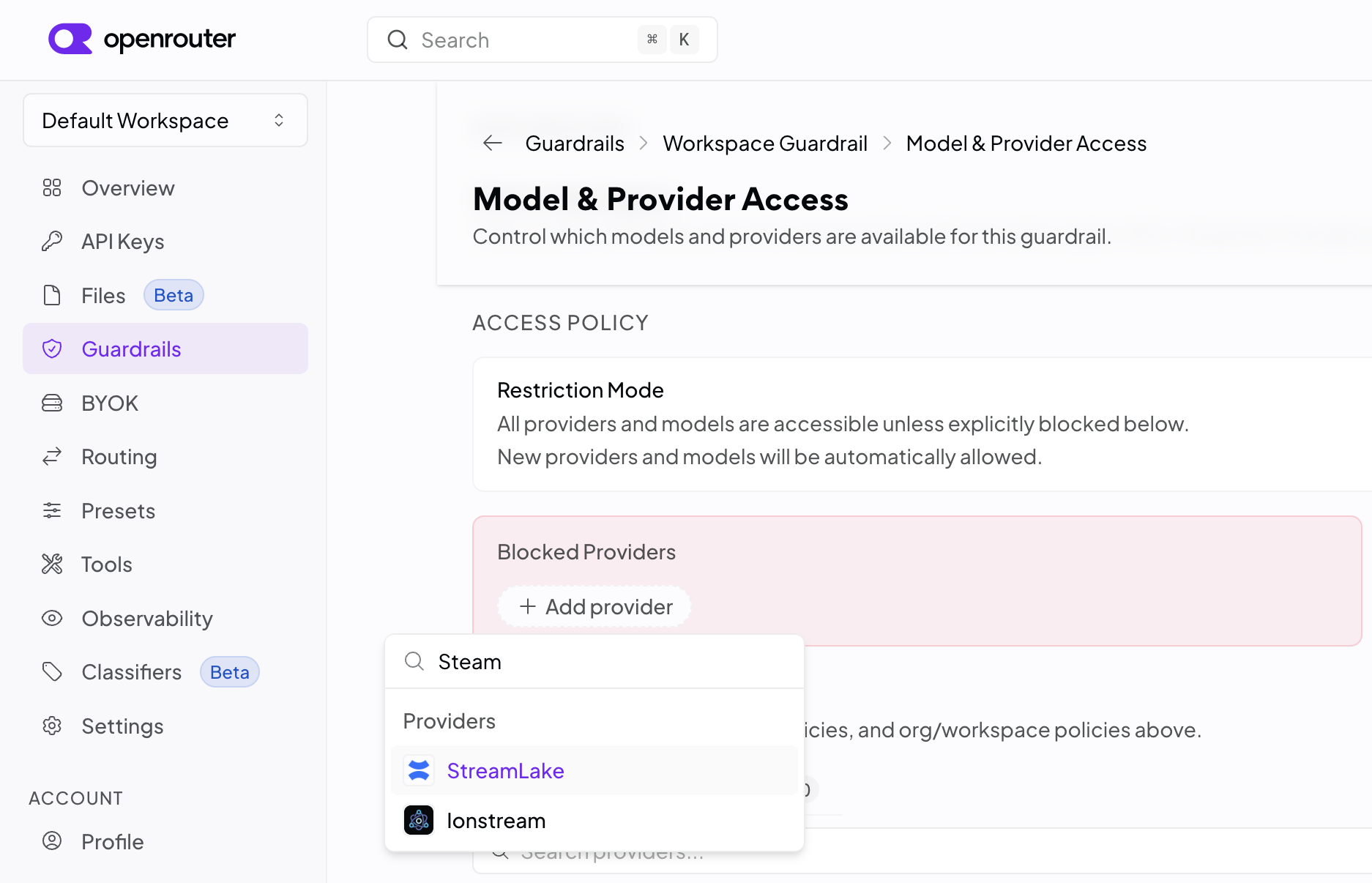
Done. Now OpenRouter routes around it and uses the healthy providers instead.
Bonus: Protect Your Side Projects Too
The dashboard setting covers everything using your OpenRouter account. But if you want to enforce it in your code as well, you can tell the API to skip a provider per-request using the provider.ignore option.
One thing that trips people up: this is not a config file you drop into your project. It's the JSON request body of the API call itself — it goes wherever your side project already makes the OpenRouter call (your fetch/axios request, your OpenAI SDK wrapper, etc.). For example, as a curl request:
curl https://openrouter.ai/api/v1/chat/completions \ -H "Authorization: Bearer $OPENR..._KEY" \ -H "Content-Type: application/json" \ -d '{ "model": "z-ai/glm-5.3-flash", "messages": [{ "role": "user", "content": "Hello" }], "provider": { "ignore": ["streamlake"] } }' The only difference from a normal chat request is the provider block — add it to every request body you send, and StreamLake will never be picked for those calls.
(In VS Code there's no per-request option, so the dashboard setting is the way to go — and it applies everywhere anyway.)
Lessons Learned
"Sorry, your request failed" tells you almost nothing. It's a generic error message. To find the real problem, test outside the editor with a simple script.
A model isn't one server — it's several. Random failures that disappear on retry usually mean one of the providers behind that model is having problems, not that the model is broken.
You can fire a bad provider without abandoning the model. OpenRouter lets you block specific providers from the dashboard (or per-request), and it'll quietly use the healthy ones instead.
References
Meta: "Sorry, your request failed. Please try again." — microsoft/vscode#253136 — the umbrella GitHub issue for this generic Copilot error
BYOK "Response contained no choices" using OpenRouter — microsoft/vscode#324335 — how empty upstream responses show up as the same generic error
OpenRouter Provider Routing docs — how routing works, plus the
provider.ignoreoptionOpenRouter Guardrails docs — the Workspace Guardrail settings used in the fix
OpenRouter Guardrails announcement — overview of the Guardrails feature
OpenRouter Providers directory — list of providers, including StreamLake
StreamLake provider page on OpenRouter — models served by StreamLake